Wednesday, January 19, 2022

NCOM Currents an Important Alternative to RTOFS

The workhorse of global ocean current forecasts in grib format is the RTOFS model. It provides ocean surface currents and sea surface temperatures (and ice) forecasts globally at 4.8 nmi resolution out to 7 days, every 6h for 4 days, then every 12 hr for the next 3 days. Its prime attraction is its ready availability from just about any program or app that shows grib files, in large part because it is available via Saildocs. 

RTOFS may not be dependable very near shore and its resolution limits its use in any inland waters it reaches into. An alternative for waters adjacent to the US is another US Navy model called NCOM. This current data is likely superior to RTOFS  for ocean waters where both are available. It is definitely higher resolution at 2.0 nmi compared to 4.8 for RTOFS. It extends out to 4 days with data every 3 hr. It also covers near coastal waters and indeed reaches into large inlets and bays such as Strait of Juan de Fuca, and the Chesapeake and Delaware Bays, among others.

The only disadvantage of this data is its lack of broad availability underway. If you happen to be using one of the top commercial weather programs such as Expedition or Luckgrib, then you can request this data for specific Lat-Lon windows and time periods from within those two programs. That can be done on shore or underway. You can even download the data from either of these apps and then export them to be used in a different app if you cared to. But not every one has one of these fine programs.

What I want to stress here is, that for work on land, or more specifically, when you have an internet connection available, anyone can easily get this NCOM data for planning or analysis, and it will display nicely in any of the popular navigation and weather programs, such as OpenCPN or qtVlm, as well as other popular commercial programs such as Coastal Explorer or TimeZero. Luckily, the data are subdivided into several regions, but even so, these regional files are too large to load by sat phone or cell phone at sea... with maybe the exception of 4G or 5G service in coastal waters, which is evolving technology.  

Available data sets are shown in the picture below.
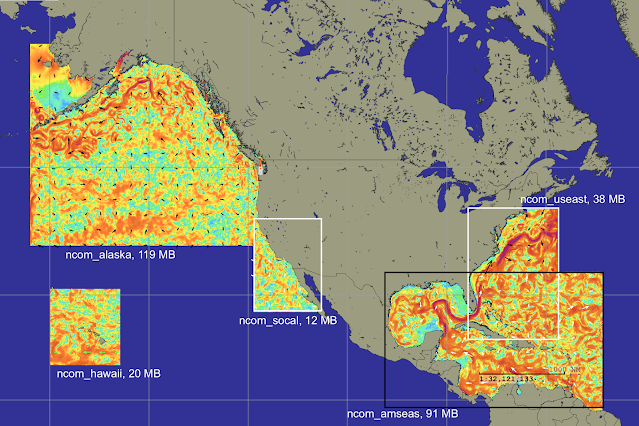


NCOM data sets loaded into qtVlm. The region called "Alaska" could be called "NE Pacific."

The files are located at this link

https://ftp.ocean.weather.gov/grids/operational/NCOM/regional/GRIB2


You can download them directly from that site, which includes the last several model runs; we would typically want  the most recent. If you are using qtVlm you can identify this URL as a "Custom grib" source and then access the files directly within the program, which loads them as well. As an example of such an interface, that set up page is shown below
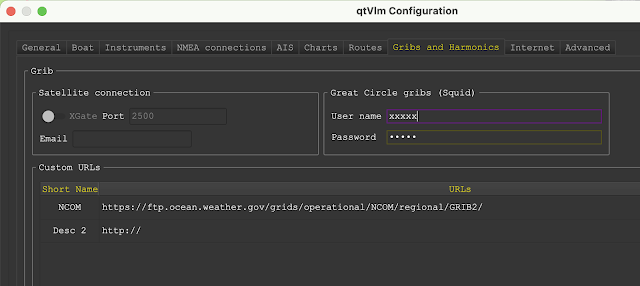


Then when ready to load the grib into one of three slots, we select the Custom Grib tab and see this:
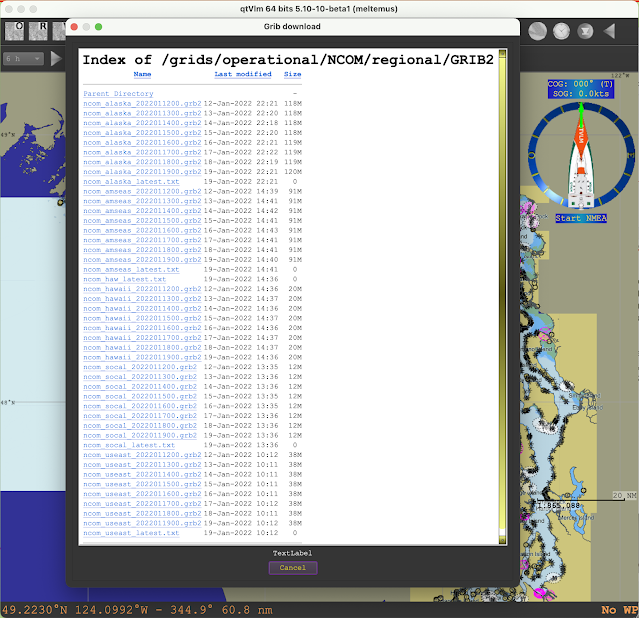

Click the file and the data loads into the program. If you have not viewed currents before in your nav program, you may need to go to the grib display set up to select display options.

Besides the value for ocean routing, an intriguing possibility is to use these data to supplement routing on inland waters where currents, primarily tidal, can have such a large effect. Below is an example of the NCOM forecasts reaching into the Strait of Juan de Fuca viewed in LuckGrib.
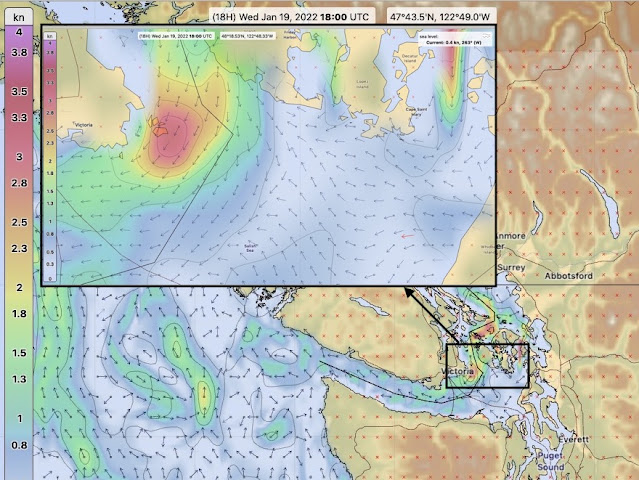
There is a lot of detail forecasted in this model, much of which we can actually check. 

Here are a couple more examples from the Rhode Island Sound area, this time looking at the data in qtVlm. 
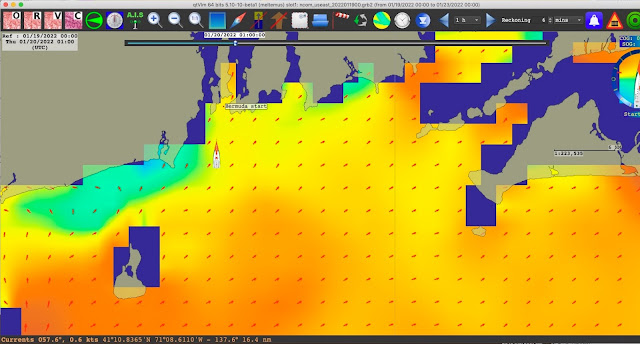
There is not a color bar scale. The values at the cursor show up in the status bar. But roughly, medium orange is 0.6 or 0.7 kts; darkest orange is 1 kt; yellow is 0.3 or 0.4 ; green-blue is 0.2, 0.1.

Comparing this to NOAA tidal current predictions is not very fruitful, but that should not be discouraging. It can be done, but it is difficult, primarily because the tidal current predictions are given as reversing, whereas in this open water they are largely rotating. Thus reading carefully you see NOAA tells us only the "average" of the flood and ebb directions. If you look at any one specific time, you are likely not seeing water flowing in the "average direction."

We do better using HF radar measurements of the currents, which you will find also do not agree with the NOAA tidal current predictions, but they do offer encouraging support for the NCOM forecasts. A sample is below for the time of the above data.
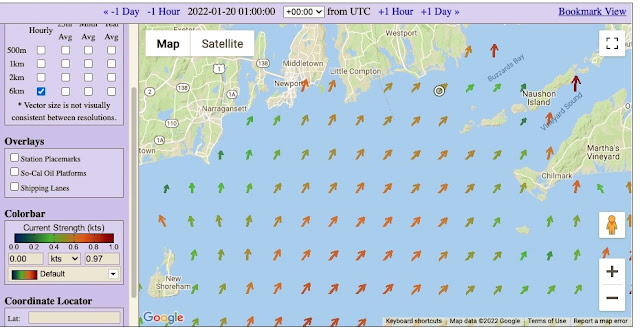

Here there is a color bar, and I think it is fair to say that this is about all the level of accuracy we should impose on these measurements. We can click each picture for precise read outs, but that might be over doing the actual accuracy.  All and all, the general flow and rough speeds are about right.  We do not really need more than that... but it would be nice to see a case where the flow is notably different, and that is shown below.
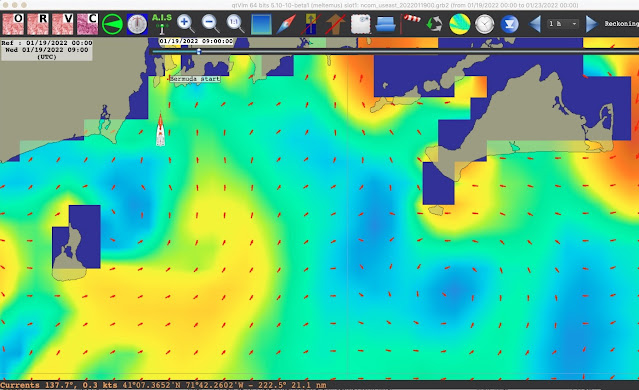
This is a view of the area 16 hours earlier. The speed color code is the same as above, and the range in speeds is about the same, but the flow is notably different, with a clear eddy below Martha's Vineyard. The HF radar measurements at this time are shown below.
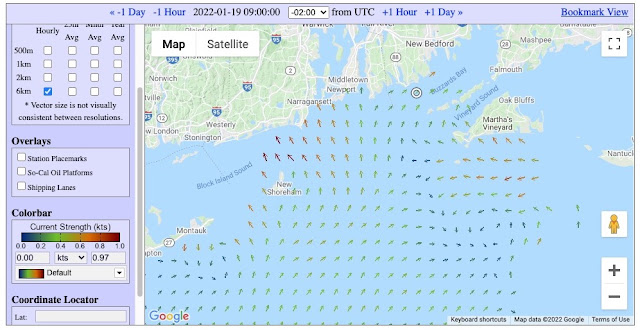
We see here a very nice confirmation of the forecast. The eddy shows up in about the right place and the other changes in flow pattern from above are reproduced.

These are just two ad hoc checks done here at random at the time of writing, but they look promising and hopefully with these notes more navigators will look into this resource and test it various ways.  It seems logical for coastal ocean routing, but we have a lot of work to do to learn of its value for more inland sailing. 

Thursday, January 13, 2022

Collision Avoidance Using AIS

Most navigation programs (electronic charting systems, ECS) will read and display AIS targets provided to them by a live AIS receiver on the boat or via an internet connection. The former source is much preferred because the internet sources are notably delayed; internet AIS can be very useful for training, but underway it is mostly for a general awareness of who might be in the neighborhood, not where they are at the moment and it cannot be relied upon for collision avoidance.

Most of the ECS AIS displays also show the age of the individual reports in seconds that can be compared with the standards shown below, which is adapted from our post Introduction to AIS.  This makes it clear to the user that they are being updated as required.


A typical display of AIS traffic is shown below. In this ECS (qtVlm) there are several options for learning about a target and also our interactions with it, which is the subject at hand that we get to shortly.


The dark blue reports are tooltips. Only one at a time would show and then disappear when the cursor moves. The CPA info in white background can  be turned on for any vessel. Ours is the white one in center screen. The Details can be turned on for one or multiple targets.  It is not the subject at hand, but the voyage data sent out may not be right. Here we see a vessel reported as "moored" that is moving at 12.7 kts, and another marked as engaged in fishing, which in fact will not be fishing till it gets back to Dutch Harbor. We can't blame the ECS for marking it with a fishing daymark, because that is what it was told.  Again our reminder: To see details, click the pic, then right click and open in new tab, and then zoom.

In the above picture we do not have the collision avoidance functions turned on. We are seeing the COG predictor lines set for 6 min. The end of the green dashed lines is where the vessels will be 6 minutes from now.  It is usually best to have this reckoning time be the same for our vessel as it is for the target vessels. This much is already very valuable information, but in fact the ECS can do much more than that.

Short of using those computed collision avoidance displays, that is what we have to work with, the COG predictor lines of our vessel and the targets, and the goal at hand here is see what can we learn from just these predictor lines.  

For any discussion of collision avoidance we must return to the Navigation Rules that tell us about collision risk in Rule 7, and in particular Part (d) (i)

Rule 7 - Risk of Collision
(a) Every vessel shall use all available means appropriate to the prevailing circumstances and conditions to determine if risk of collision exists. If there is any doubt such risk shall be deemed to exist.

(b) Proper use shall be made of radar equipment if fitted and operational, including long-range scanning to obtain early warning of risk of collision and radar plotting or equivalent systematic observation of detected objects.

(c) Assumptions shall not be made on the basis of scanty information, especially scanty radar information.

(d) In determining if risk of collision exists the following considerations shall be among those taken into account:

(i) Such risk shall be deemed to exist if the compass bearing of an approaching vessel does not appreciably change.

(ii) Such risk may sometimes exist even when an appreciable bearing change is evident, particularly when approaching a very large vessel or a tow or when approaching a vessel at close range.


First, modern court cases have established that "all available means" definitely includes ECDIS (for commercial vessels) or ECS for those without ECDIS, and that AIS is now on par with the radar requirements.  In short, these are powerful tools and it is essentially negligent not to use them if available.

For present considerations, the key point is (d) (i), which tells us how to detect risk of collision using compass bearings. Note the word "shall"; this is not a suggestion, nor an option, it is required.  In basic navigation we often teach a shortcut using relative angles on the bow.

The above is from our textbook Inland and Coastal Navigation. This method assumes the heading of our boat does not change during the observation. Using actual compass bearings removes that uncertainty.

We can apply this principle to the display of AIS projectors, because we have in effect two views of the target taken 6 minutes apart, or 12 minutes if we used that. If the bearing does not change we are on a collision course. If the bearing moves toward the bow, the target is crossing in front of us; if it moves aft, we are crossing in front of it, as illustrated below.


Below is a compilation to show that the concept of bearing moving toward or away from the bow can be applied to targets seen in any direction.


So even without sophisticated closest point of approach (CPA) functions, we can determine if a target is crossing in front of or behind us... that is, as soon as we are able to measure or estimate the bearing to the target from preset positions and also from the tips of the projection lines which would be the bearings we see after watching the target for 6 min or 12 min.  Six minutes is a popular reckoning choice, because at 6 min the length of the predictor line (nmi) is one tenth of the boat speed  (kts).  At 12 min prediction, we divide the length by 2 to get the speed.

Most ECS display the range and bearing to each target, so we do not have to measure the first one, just read it.  Also all ECS  have a quick measurement tool or ruler tool that we can use to measure the bearing from our projector tip to the target projector tip, and that is then the second bearing. Below is a sample from qtVlm. We are left then to reason through the direction we are looking and decide if this is toward or away from the bow.... or if we are on a collision course. 

Keep in mind that a collision course is indeed a rare thing. Just a degree or so (that we cannot really measure in this method) will bypass a collision, and a notable degree change is a fairly big separation.


Here the red lines and dashed magenta line were just added for perspective. We read first bearing from the tooltip and then use ruler tool to learn that the next bearing would be notably forward so this target is passing in front of us.

If we then turned on the closest point of approach (CPA) data we would see this immediately. Below is that view about when they cross.


We see that indeed this target passes well in front of us, and we will have CPA in 8 min, and the CPA will  be 1.1 nmi. Notice where our 6 min position is compared to 2 min later at CPA.  With this type of data we can get these forecasts from a long distance off, but that brings us back to Rule 7 (c), which is the good advice for radar observations that also apply to AIS computations. We do not want to rely on such data from a long ways off, where just slight course changes or current sets can affect the later CPA. 

Note that the AIS gives us both COG and true heading for those vessels with a heading sensor, so we can often get an idea about the currents—and maybe understand why their tracks are drifting off to one side of the traffic lanes or other obvious fairway routes.  We saw this very nicely in our reenactment of the grounding of the Ever Given in the Suez Canal.


I will add more examples later on, with and without the CPA info to illustrate this point.

To keep this in perspective, our logical first choice is to learn how to use the CPA configurations in our ECS and these then typically solve the problem of collision risk evaluation. But if you are new to an ECS on a new boat, you may not know or understand what is being shown, so this basic view of the targets based on COG predictors alone could be helpful. Also sometimes the CPA configuration for AIS can have multiple settings to account for various conditions, which means there is the chance that they are not set up in the optimum manner for present conditions.

Also, needless to say, learning whether a target is crossing in front of you or behind you is just the beginning of our obligation in the Navigation Rules.  From Rule 7 we move on to Rule 8, Action to Avoid Collision.


Saturday, January 1, 2022

Compare Pub 249 and Pub 229 Using the Celestial Tools App

Celestial navigation sight reduction when done manually these days is primarily with the aid of Pub 249 or Pub 229. The former was developed for aviation; it is somewhat easier to use than Pub 229, the marine navigation standard, but is less precise in that air navigation by cel nav is less accurate to begin with because of the speed of the aircraft.

Nevertheless, Pub 249 remains popular with many ocean sailors. All USCG exams, on the other hand, must be solved using Pub 229.

Pub 249 rounds calculated heights (Hc) to the nearest whole arc minute, making them effectively ± 0.5' in precision, with azimuths (Zn) given to the whole degree, meaning ± 0.5º, whereas Pub 229 gives the tabulated values of Hc to the nearest 0.1' and azimuths to nearest 0.1º.  This does not, however, tell us how much a position fix might vary using these two different solutions. There are too many variables involved in that we have to look at the intersections of plotted lines of position that can be in more or less random directions.

We can look into this difference using an extensive practice exercise on running fixes (Exercise 6.6) from our textbook Celestial Navigation, which we can solve using a unique function of the free PC software app called Celestial Tools written by the late Stan Klein, an innovative and dedicated navigation instructor. Stan originally developed this tool for Power Squadron (USPS) members and instructors, and then made it available to the public. We have hosted his latest versions of the app for many years, and continue to so so, as was his wish.


There are 5 more exercises like this one in the textbook, each yielding practice with 3 running fixes (1 to 2, 2 to 3, and 1 to 3).  They cover all hemispheres and various course headings.


This is the graphic index from Celestial Tools. The function we are using is "SR Methods & Fix," which is a tool that tells us each of the intermediate answers to a sight reduction process for the various tables available plus the direction computation.  There is a description of the  all of Celestial Tools functions that supplements the included Help file. Find all of these in the Starpath Downloads page.

This exercise offers three running fixes we can use to check the differences between using 229 and 249. It is a unique form of exercise, copied from USCG license exams, which I will come back to. All sextant corrections are done; all Nautical Almanac lookup is done, so we are left to using the sight reduction tables to find Hc and Zn and then plotting two or more of the LOPs and advancing them to the same time for a running fix.

Below are the the data screens from the SR Methods & Fix function using 249 and 229 for the 1015  sight.

The first step is updating the DR to the times of the sights starting from the given position at 0900 WT. These results are shown below.


1015 sight reduced with Pub 249


From Pub 249 we get Hc = 58º 53' with a = 17' T 099º (which rounds the measured Ho minutes of 9.7' to to 10' according to 249 instructions, but we have no real reason to do that). A better result is Pub 249:  a = 16.7' T 099.

A short digression about the bottom center output show: The USPS and the Coast Guard Auxiliary define what they call an estimated position as the nearest point on an LOP to the DR position. That accounts for what you see here in this output labeled EP. This concept, however, has no real practical value for ocean navigation under sail, which is our main student body. Hence we not only do not teach this, we strongly discourage its use. It is much more likely to be misleading than to be helpful.

The best way to determine an "estimated position" is to use the log and compass DR corrected for everything you know of that might shift that position. In our terminology, we do not distinguish a DR position from an estimated position. This is the historical definition of a DR position that we adhere to. Certainly the best EP will indeed be located someone on the latest LOP if you have one. That is a definition of the LOP, but the nearest point on the LOP to the corresponding DR is not inherently anything more than uninformed wishful thinking.


1015 sight reduced with Pub 229

From Pub 229 we get Hc = 58º 53.6' with Pub 229: a = 16.1' T 097.6º  (Stan chose to round this to 098, but we do not need to do that. With care, we can plot to fractions of a degree.)

This example finds the a-values differing by 0.6' and Zn differing by 1.4º between 249 and 229.

Now we look at the 1156 sight.

1156 sight reduced with Pub 249

From Pub 249 at 1156 we get Hc = 80º 16' with a = 22' T 139º.

1156 sight reduced with Pub 229

From Pub 229 at 1156 we get Hc = 80º 16.4' with a = 21.6' T 135.8º.

Now we carry out a running fix between 1015 and 1156 sights using both reduction methods. We will compute this plotting as we are looking for small differences, but it could be done by hand.

From Pub 249
for the 1015 sight we have: AP 22 N, 124º 47.1' W,  with a = 16.7' T 099º
for the 1156 sight we have: AP 22 N, 125º 4.1' W,  with a = 22' T 139º

With speed 13.0 kts on course 250, we have a run time of 1h 41m and a distance run of 21.9 nmi.

From Pub 229
for the 1015 sight we have: AP 22 N, 124º 47.1' W,  with a = 16.1' T 097.6º
for the 1156 sight we have: AP 22 N, 125º 4.1' W,  with a = 21.6' T 135.8º

From the computed intersections below, we find that the pub 249 fix at 1156 is  21º 39.6' N,  124º 53.2' W and the Pub 229 fix is at  21º 39.3' N,  124º 53.7' W.  

Note the special convention on angle formats in this calculator.

Rfix 1 to 2 using Pub 249,


Rfix plot 1 to 2 using Pub 229.


These two positions are just 0.55 nmi apart, which is quite a surprise in that the 1156 Zns differ so much (139 vs 135.8).


________________________

We can now do the third sight reduction at 1425 and get another rfix from 2 to 3.

1425 sight reduced with Pub 229

From Pub 229 we get Hc = 60º 42.6' with Pub 229: a = 12.3' T 261.1º  (Again, we do not need to round Z when figuring Zn.)


1425 sight reduced with Pub 249.

From Pub 249 we get Hc = 60º 42' with Pub 249: a = 12.9' T 259º 

This example finds the a-values differing again by 0.6' (a coincidence) and the Zn differing by 2.1º.  For the rfix from 2 to 3 at 1425 we have:

From Pub 249
for the 1156 sight we have: AP 22 N, 125º 4.1' W,  with a = 22' T 139º
for the 1425 sight we have: AP 22 N, 125º 18.1' W,  with a = 12.9' T 259º

From Pub 229
for the 1156 sight we have: AP 22 N, 125º 4.1' W,  with a = 21.6' T 135.8º
for the 1425 sight we have: AP 22 N, 125º 18.1' W,  with a = 12.3' T 261.1º

From the computed intersections below we get for the pub 249 fix at 1425 of  20º 47.4' N,  125º 17.0' W and for the Pub 229 fix: 20º 41.5' N,  125º 18.3' W  


 Rfix 2 to 3 using Pub 249

Rfix 2 to 3 using Pub 229

These two solutions differ by 6 nmi, which is quite different from the sight 1 to sight 2 offset between sight reduction tables. 

We begin to see the issue involved. In the first case the sight reduction differences were larger than in the second case, but the second case had 10 times larger offset in final positions. The first difference was frankly smaller than I would have guessed, and the second one was larger than expected. Keep in mind that the 229 solution is the better one, and we are seeing here the cost of the lower precision of 249. These differences are mostly due to the Zn values and we can improve on the 249 values with interpolation, as outlined below.

____________

We can do one final test with a running fix from sight 1 to sight 3, and for these we have the solutions already done.

From Pub 249
for the 1015 sight we have: AP 22 N, 124º 47.1' W,  with a = 16.7' T 099º
for the 1425 sight we have: AP 22 N, 125º 18.1' W,  with a = 12.9' T 259º

With speed 13.0 kts on course 250, we have a run time of 4h 10m and a distance run of 54.2 nmi.

From Pub 229
for the 1015 sight we have: AP 22 N, 124º 47.1' W,  with a = 16.1' T 097.6º
for the 1425 sight we have: AP 22 N, 125º 18.1' W,  with a = 12.3' T 261.1º

The pub 249 fix at 1425  is at  21º 29.3' N,  125º 25.8' W

The pub 229 fix at 1425 is at  21º 28.9' N,  125º 26.3' W  


We then compute the distance between these two:


And we see that they differ by just 0.6 nmi, which is similar to what we saw in the sight 1 to sight 2 rfix. In this case we can also compare the fixes we got from 1 to 3 with what we got from 2 to 3.

In principle the 2 to 3 would be the better fix in that it is a shorter run so the errors in the DR are less crucial, and also the 1 to 3 sights let the sun get too far west so the intersection angles are not as good: 2 to 3 intersection at 54.7º and 1 to 3 at 16.5º.

2 to 3
Pub 249 fix at 1425  is at 20º 47.4' N,  125º 17.0' W 
Pub 229 fix at 1425  is at 20º 41.5' N,  125º 18.3' W  

1 to 3
The pub 249 fix at 1425 is at  21º 29.3' N,  125º 25.8' W

The pub 229 fix at 1425 is at  21º 28.9' N,  125º 26.3' W  


It is left as an exercise for those who want to study this more to work through the remaining examples using this procedure.

One way to improve the values of Z for any tables we use is to interpolate Z for the declination minutes. The standard procedure with 249 or 229 always takes Z from the degrees part of the declination, which was 14º in these examples. In all cases, however, the dec minutes were very large, so we would have gotten better results by using 15º dec to find the Z value. In this example it would have got 97 for 249 and 97.4 for 229, making the final fixes a bit closer still.


Friday, December 31, 2021

True Wind and Ground Wind—and Why We Need Both

When we are underway, we measure the apparent wind speed (AWS) with an anemometer and the apparent wind angle (AWA) relative to the bow with a wind vane. We also read the heading of the bow (HDG) with a heading sensor and the speed through the water (STW) with the knotmeter. In the presence of leeway (LWY), the course through the water (CTW) is found from CTW = HDG + LWY, where we can either measure the LWY separately or estimate it from the heel angle and STW. 

Thus we can find the apparent wind direction (AWD) from AWD = CTW+AWA, and from this we can solve for the true wind speed (TWS) and true wind direction (TWD), as shown below. 

This true wind, shown on the left above, is what sailors care about—more specifically, what the helmsman and trimmers care about, because this is the wind their target speeds are tied to as presented in the polar diagrams.

The navigator and tactician, on the other hand, have the job of planning the route ahead, so they need to know if the wind we are experiencing now is what the forecasts said it will be, and they need to know if the changes in the wind that have taken place are consistent with the forecasts. To do this, they cannot use the same "true wind" that the trimmers use, unless the (COG and SOG) vector is the same as the (CTW and STW) vector. These two vectors can differ for a lot of reasons, including instrument calibration and steering bias, but the usual cause in a well founded vessel is actual motion of the water, currents.

The wind in the forecasts is "ground wind," meaning it is relative to the fixed earth, the ground. The true wind on the left above is relative to the water, and if that water is moving the ground wind will not be the same as the true wind. It is usually not a big difference, but it can be big, and even in cases where it is a small difference, this difference could mask a notable change in the weather. Thus it is best to have two sets of records (histograms), one of true wind and one of ground wind.

A change in the true wind alerts the helmsman that a new heading might be called for in steering, and a plot of the trend lets them think ahead to new sails or points of sail. But changes in true wind as such do not necessarily tell us what is going on with the weather map ground wind, because true wind is tied to STW, which in turn is dependent on CTW. A change in the ground wind speed might lead to a change in true wind direction, when in fact the ground wind did not change direction... or vice versa.

This possibility is enhanced when sailing in strong currents, which is common in the Pacific Northwest, and in other places like the Bermuda Races that have to deal with Gulf Stream eddies and meanders, with currents up to 4 kts. 

We look at some numerical examples below, but first a quick look at how this distinction is implemented in the nav station. There are two ways to address this. Either the nav program accepts all the sensors independently (CTW, STW, COG, SOG) and then it computes the four results itself (TWS, TWD, GWD, GWD) or sophisticated wind instruments that include all these sensors, compute both values for display and graphing on their own multi-function displays, or they transmit TW and GW to the computer nav programs for them to display and analyze.

Expedition, Rose Point Coastal Explorer and ECS, qtVlm, Deckman and TimeZero/MaxSea are examples of navigation programs that do these computations based on individual inputs, although TimeZero displays only one type of true wind at a time—you decide at setup if the displayed "True wind" is going to be TW or GW as defined above. Also each of these programs will also display the pre computed results from instruments if delivered to them in a NMEA sentence, discussed below.

Two examples of wind instruments that compute, display, and export both true wind and ground wind are the B&G H5000 and the AirMar 220WX. The former uses the terms true wind and ground wind, but the latter uses a NMEA influenced misnomer called "theoretical wind." The AirMar theoretical wind output can be GW or TW or both, but to get TW you must send it a NMEA sentence (VHW) with knotmeter speed—that unit has a GPS and a heading sensor, but no knotmeter. 

This wind data gets transmitted to and from the computer using the NMEA sentences discussed below.

AWA and AWS use VWR, and TWA and TWS use VWT. In both of these sentences, the wind angle (0 to 180) is followed by a L or R (left or right) for port or starboard winds. The sentences are simple and symmetric. It seems T stands for true and R for "relative," which is here meant to mean apparent.

These sentences are in wide use, but NMEA recommends a different sentence to use for both of them, namely MWV, which is a more complex sentence. When you have both AW and TW to transmit, you would have two MWV sentences, distinguished by an R or T following the wind angle. They say the T is for theoretical, but the only logical way to interpret what they write is to call that True, water based, as defined above.

The complexity comes in the way the wind angle is defined for both T and R. It is the (0 to 360) relative bearing of the wind direction. Thus a wind angle of 90 would be 90 R in the other sentences, and a wind angle of 270 would be 90 L. The wind angle 330 is 30 L, and so on.

GWD and GWS are given in MWD. Here the wind direction is just 0 to 360, "relative to North," and the speed is the wind speed "that blows across the earth's surface."

In principle, the wind data in the sentence MDA (Meteorological Composite) should in fact be GW ("wind speed and direction relative to the surface of the earth"), but this sentence is misused so often that NMEA discourages its use, and indeed this one is fading away. 

__________

I want to add specific numerical examples to show the value of GW for weather analysis and forecasting, and specifically why recording TW alone could miss vital signs of weather changes... but this will take some time, and I want to post this much so I can get feedback from anyone interested in this topic.  I also now have some nice Expedition log data thanks to racing navigator Andrew Haliburton, which I can show as well once we get it analyzed.

We do not need to discuss the value of the TW (water based true wind), because that is fundamental to sailing and well known.

For now, please let me know if there are comments on the above to date. I know there are sailors with strong feelings on this topic, so my goal here is to show how these two concepts fit onto the boat, and who specifically might use which.

I found it interesting to note that the racing program Adrena refers to and tabulates the wind in a grib forecast as GWS and GWD, which is of course true. But if you ask the meteorologist who coordinated the production of this grib forecast  if that is ground wind, they would almost certainly say, "What is that?  Do you mean true wind?"

In the meantime, here is a quick look at this distinction using qtVlm simulator and live data from the Gulf Stream that I just now downloaded: GFS wind and RTOFS current.


Above is view without current and we see TW and GW are identical and both equal the wind on the grib, read from the cursor position in the status bar.

Recall that after clicking to see the image you can right click again, open in new tab and then zoom in for more detail.

Below we add the Gulf Stream and this boat is sitting in about 3 kts at the moment.


Now we see that only the GW agrees with the grib winds and the wind directions differ by 4º and the wind speeds differ by 3 kts.  So the effect is clear, but the real value comes in analyzing the trends, which can tell us much, even if the actual values do not differ too much, but this will take me a bit longer to put together.

Another thought to address is the uncertainty in the forecasts is something like ±2 kts on the wind speed and ±10º or maybe a bit less on the direction. These uncertainties are about the level of differences in the two wind definitions in some cases—but that fact should not distract us when it comes to an effort to do the best we can in the analysis. One definition of the wind is right for this comparison and the other is not, and even though the forecasts have a notable uncertainty, that does not mean they will be wrong by that much. In short, it is not productive to ignore this distinction in wind definitions because the uncertainties in the forecast data and our own measurements might be comparable. By ignoring the distinction we increase our measurement uncertainty in a way that could be avoided.
__________

Here is an earlier article that includes the formulas we use to compute the winds, plus much discussion of the concepts in the comments.  True Wind From Apparent Wind — Revisited.