Friday, July 22, 2022

Start Saying Goodbye to Your Favorite Paper Chart

This should not be a surprise. NOAA told us they were Sunsetting Traditional Paper Charts back in 2019 and that they would all be gone by the end of 2024. After these charts are gone, we will rely on electronic navigational charts (ENC) and the new NOAA Custom Charts (NCC) that we design on our own using an online NOAA app and print on our own in a size and quality we choose.

This note is an alert that this is happening at an accelerated rate... plus we  have a way now to know the status of our favorite charts.  In item (1) of our starpath.com/getcharts resource, go to the paper chart index on the left and you will see something like shown  below for the San Juan Islands area.

Notice a few things new. Several of the charts are now gray and their traditional names have been changed to be preceded by the letters "LE." This means "last edition." I have clicked one of them (it turns orange) to show its details on the right. Take notice of the text in red. This chart is no longer updated and will be removed on Oct 5, 2022—2 month and 13 days from today. The same with all of the gray ones.

These are not random, obscure charts. These are the main working charts for the San Juan Islands, and it is not just this area. The extent of cancelation is even higher on the Gulf and East Coasts.


All gray charts west of Alabama are schedule for cancellation same time as the West Coast (Oct 5, 2022). Those on the East Gulf Coast and on the SE Atlantic are scheduled for Jan 4, 2023—that is 5 months 14 days from today.


The Central Atlantic has a lot charts leaving on Nov 16, 2022, which is just 3 months and 25 days.

When these traditional charts are gone, there are two NOAA Print on Demand outlets that have announced on their websites that they are set up to print the new ENC versions of these same charts. In other words, they are considering making their own NCC that are the exact aspects, scales and sizes so you could just ask for the chart number. 

But it is not clear if that is the best solution. The NCC app gives the chart designer a lot of freedom on what is included and what exact area is covered and at what scale. I think it will be best for mariners to learn how to use the NCC app to make their own decisions on what paper charts they want to replace the old ones.  

Luckily, there is an easy place to go to learn to use the NCC app, namely the Starpath online Course on Electronic Chart Navigation, which includes our unique textbook on the subject. We focus on the actual ENC usage, but do have an extended lesson on how to make the NCC along with practice exercises and individual support.


Needless to say, the goal of the US National Charting Plan is not to navigate on these NCC, but rather to navigate on the ENC, which is what we teach. But NOAA knows that many mariners, if not most, do indeed want to have access to a paper chart at all times, just in case—and that is the main purpose of the NCC.

Beside NOAA doing away with the traditional paper charts in lieu of ENC and NCC made from them, the USCG is helping this transition along. They have just competed a call for comments on their proposed new ruling that commercial vessels must have on board a functional way (ECS or ECDIS) to use the official ENC. Third party charts that dominate the recreational echart world, do not count.

In short, we have arrived at the moment where we have gone from a time when the ENC were a legal alternative to paper charts to a time when ENC are the required means of navigation. We stand by to learn how this specific ruling evolves, and what all vessels will be covered, but it will indeed be enacted.

The side message to this note is this: knowing how to find these LE dates, if you want a copy of the last valid traditional paper chart, now is the time to order it.  Right now you can still even get a PDF of it.


______________


Tuesday, July 5, 2022

Magnetic Variation on Electronic Navigational Charts (ENC)

Magnet variation (magvar) is crucial to marine navigation. It is the difference between true north and the direction of north read from a compass card, which is shown on the compass rose on a chart as the difference between true north and magnetic north. We might like to navigate by all magnetic bearings since we drive the boat by the compass, but we cannot avoid dealing with true bearings at times. Tidal current directions are always given in true, as are wind directions from any official forecast or observation. Charted navigation ranges are given in true, as are the visible boundaries of sector lights. Any cel nav solution must be worked out in true bearings, and so on. 

In short, we might avoid them whenever possible, but we have to deal with true bearings. But that is navigator talk. Normally you would communicate related results or desired courses to the helmsman in magnetic and you would expect all logbook entries to be in magnetic.

Working with magvar is just one more aspect of navigation that is improved with the use of ENC. Magvar is an ENC charted object, and we can cursor pick any place on the chart to see what the local value is at that point. ENC get the latest values (magvar drifts slowly with time) from the World Magnetic Model (WMM), which is updated every 5 years on the even 0s and 5s. The most recent is 2020; next update is 2025.

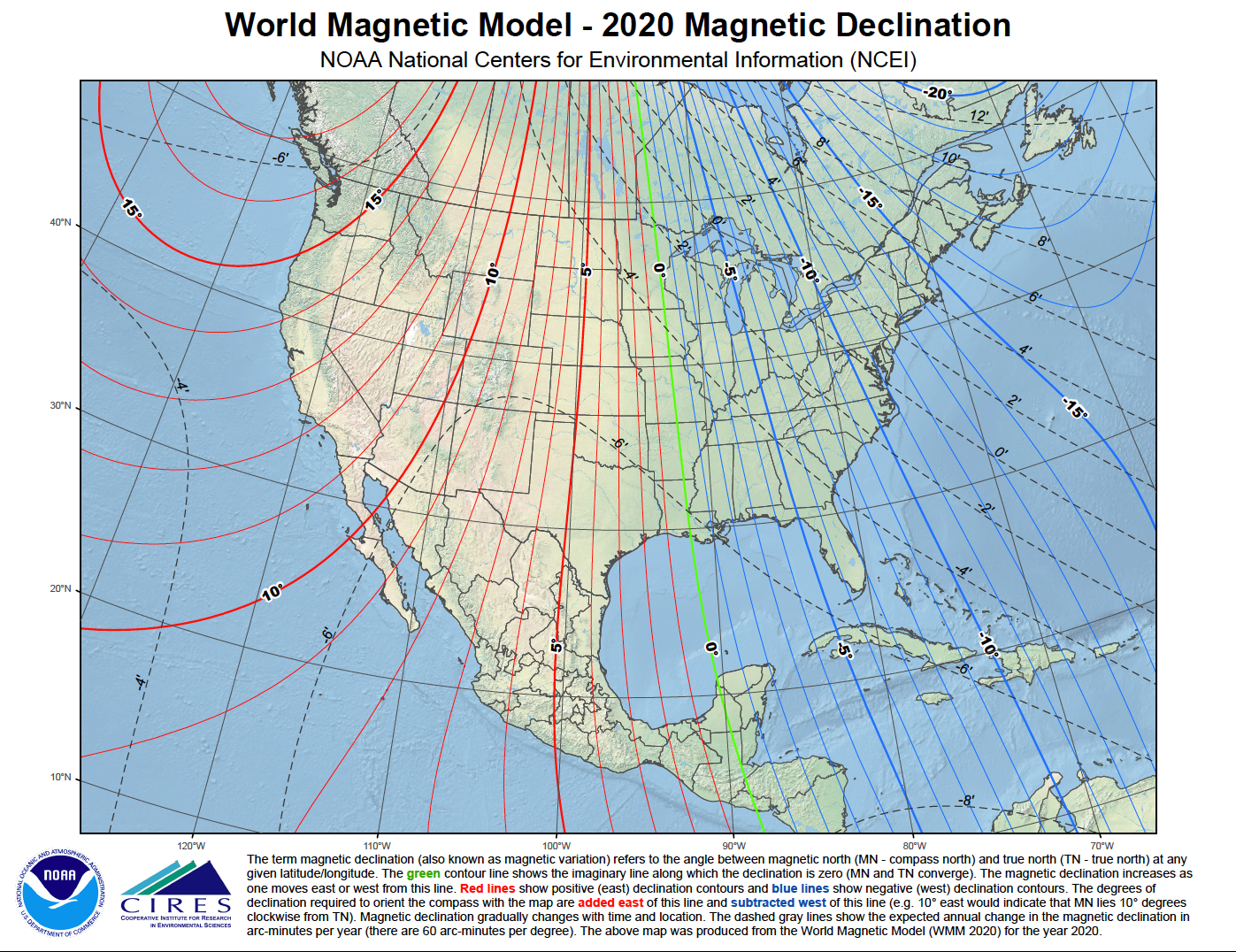
The image below shows how magvar varies over the country, along with its annual rate of change.


You can get a high res PDF copy including one for AK at the WMM link above. 

The line separating E and W variation goes through New Orleans. The 2020 value at the NW corner of the US at Cape Flattery is about +16º (16º E) with an annual rate of change in minutes of about -6'/yr (6' W)—at present rate, every 10 years it will change by 1º; but the rate of change also changes with time. The spatial distribution of this change is on the edge of a col (saddle point) at this location, so it is not easy to read from this plot, but the actual values are well known at all locations (see WMM link). The reference year for these values is 2020.

Why ENC are so much better than paper charts on this topic is tied to the fact that traditional paper charts are being discontinued and all will be gone by the end of 2024. Consequently they are not being updated except in crucial matters—getting the magvar wrong by a degree or so once in a while is not really crucial in most circumstances.

Most current (July 2022) ENC have the 2021 values encoded in the charts (corrected from 2020 WMM), whereas the latest paper charts or the raster navigational charts (RNC) made from them could be very old. Two examples are below.


This latest edition of 18484, Neah Bay at Cape Flattery, WA, refers to magvar data from 2006. If we use that to predict the present value, which you would have to do if this is the only chart you have, even with it being the most current version, we would figure 2022 -2006 = 16 yr x 11'/yr = 176' = 2.93º. In 2006 it was 18º 15' = 18.25º, so the 2022 value would be 18.25 - 2.93 = 15.32º E, which would round to 15º E. Paper charts refer to the change as annual "increase" or "decrease," whereas with ENC we have to think though the algebraic use of + and – signs. E is +; W is –.

Checking the latest ENC for this area we get 


Thus we see that the actual variation is 16º E - 1yr x 6'/yr, which is no notable change, leaving 16º E. In short, this latest paper chart has magvar wrong by just 1º even using this older data.

Neah Bay is remote, but Elliott Bay is not, being the access to Seattle. Below is the latest Elliot Bay Chart, 18449.


This latest printed chart value is from 2017, which means corrected from 2015 WMM. At 2022 we have 5 yr x 9'/yr = 45'=0.75º, which implies a current magvar of 15.25º E. We find the actual value from the latest ENC below.

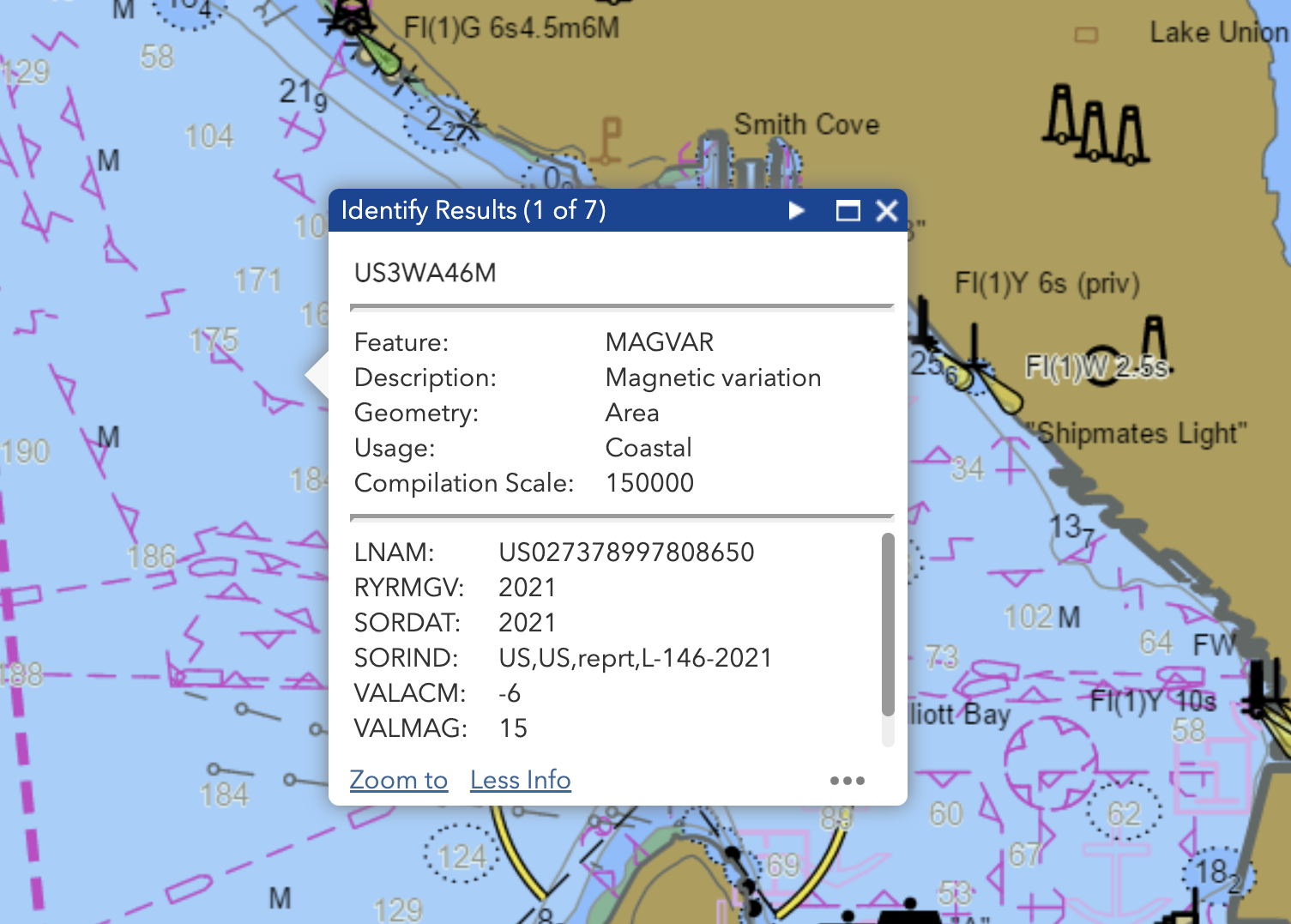
An ENC pick report using the NOAA online ENC viewer. Here we are reminded that some ECS use only plain language names of objects and attributes, whereas others use only the so called acronyms (actually just abbreviations) for them... and some use both or offer the option, which is my preference.

The object is magnetic variation (MAGVAR); the attributes to this object are:

LNAM = "Long Name" a combination of several object ID parameters (not related to navigation; it is an object identifier, not an object attribute; rarely if ever shown in ECS)

RYRMGV = Reference year for magnetic variation

SORDAT = Source date, which, in this case, is date the data was posted

SORIND = Source indication, which is where the data comes from, an internal NOAA doc number.

VALACM = Value of annual change in magnetic (in arc minutes per year)

VALMAG = Value of magnetic variation (in whole degrees for an area magvar report.)

We always use RYRMGV for figuring the annual change, not the Source Date. In 2022, we have only a 6' change, so the actual variation at the moment is still 15º E, which is essentially what we got from the old data on the printed chart. This means that the rate of change changed at Neah Bay, but not so much here in Elliott Bay. It also shows why updating this magvar data is not a crucial paper chart update in most cases, and hence is not being done.

______

With those basics behind us, there are a couple more subtleties regarding magvar in ENC. Below is an expanded section from our book Introduction to Electronic Chart Navigation.

2.13 Magnetic variation

We can get spoiled using ECS navigation, because we just push buttons to switch back and forth between magnetic and true directions. In a dark sense, we don’t even need to know what the variation is. It is rather like not needing to know how to divide, since we have a calculator in our phone, or how to spell, when there is a spell checker in everything we write with. This is just a small part of the slippery slope of electronic navigation, but still one to be avoided.

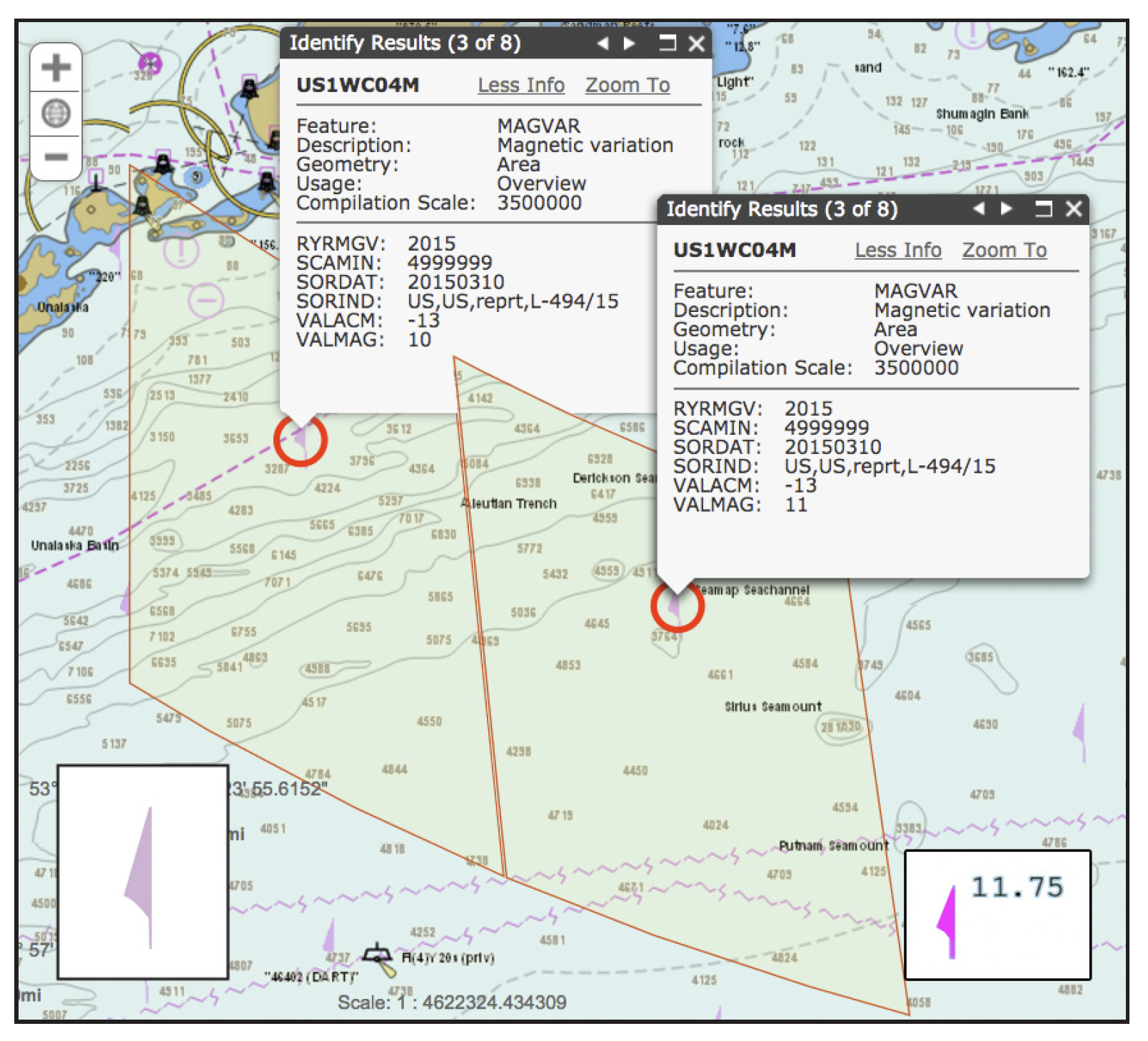
Magnetic variation (MAGVAR) is an S-57 object that can be encoded into an ENC as either an area or a point object. Area examples are shown in Figure 2.13-1. Some hydrographic offices include this data, but others (i.e., Canada) do not—inland ENC (Appendix 8) do not include MAGVAR in either the US or international versions. When MAGVAR is present as an area object we can find the value of the variation with a cursor pick at almost any place on the chart. The object has a scale minimum attribute (SCAMIN), so it might not be reported on all display scales. On NOAA charts, the SCAMIN value for MAGVAR seems to be the same as used for the soundings, so if you can see soundings you can see the variation symbol, and if not, you can’t—assuming the soundings display has not been turned off.


Figure 2.13-1. Another example of the value of the NOAA Online ENC viewer (Section 1.8), which has the instructive feature of outlining the boundaries of line and area objects when selected. Thus we can see the extents of MAGVAR area objects. We have made a composite of the reports to illustrate this pattern. In actual use, only one report at a time can be viewed. The MAGVAR areas can have other shapes, and the symbol changes locations as you view the area in different perspectives (called a “centered” symbol) The left-side inset shows the area object MAGVAR symbol; the right-side inset is a point MAGVAR object, showing just the value at that specific point. A hollow version of either symbol marks magnetic anomalies. The acronyms used in the pick report are explained in Figure 2.13-2. The scale minimum attribute of MAGVAR is typically the same as the soundings, so don’t expect the MAGVAR object to show up in a report if soundings are not showing. This image is from 2016.


There are symbols for magnetic variation seen periodically on the chart, although, as noted, we do not need to click it specifically to get variation. The symbols mark the identifying locations of the various MAGVAR area objects. These are the areas over which the variation is the same within one degree. These symbols are sparse in regions where the variation is not changing by one degree over the geographic span of the ENC cell. There is no correlation between the location of these MAGVAR symbols on an ENC and the placement of compass roses on the corresponding paper charts. On any ENC where we see a lot of these symbols it means the variation is changing by about 1º between the symbols. 

A sample cursor pick report for a MAGVAR area object is shown in Figure 2.13-2. This is in principle the same data we get from a compass rose on a paper chart—if the paper charts were being kept up to date in this regard, but they are not. Often we do not need the value any more precisely, and since we are unlikely to be using old ENCs (as opposed to sometimes using old paper charts) it would be rare we needed to correct for the annual change in ENC values.


Figure 2.13-2. Cursor pick report for object Magnetic variation (MAGVAR) at a point. Point symbols include a text label showing the Value of the variation (VALMAG) to the hundredth of a degree at that specific point (15.83º E) and the Reference year (RYRMGV). The actual point report (top) includes values to the tenth of both variation (positive values are east) and its attribute Value of annual change in magnetic variation (VALACM), which is always in arc minutes, with an annual change toward the east being positive, and toward the west negative. 

     The bottom part of the report is for the area value of the variation at that location, which will always be rounded to the nearest whole degree that is the average value for the local area. You would get this same area report by cursor picking any place near this point on the chart.

     Also shown is a MAGVAR area symbol, which is larger, in a fainter magenta, with no label. These symbols mark the area where the variation is constant to within 1º. These are elusive symbols (called “centered”), because they move on the chart as you change the display, staying as near the center of your screen as possible. They are identifying an area on the chart, not a point. Some ECS choose not to include these MAGVAR area symbols, as we can always get the variation with a cursor pick on the chart that reports the variation in that area. The only value of the symbol is to mark where the average variation is changing by 1º. More symbols (as seen farther north) indicate more change in the variation. Note that it can happen that an area average (15º in this case) is not the same as a point value in that area rounded to the nearest degree (15.8º in this case).

     Also shown for comparison is the symbol for a point report of a magnetic variation anomaly. An area of anomaly symbol is the same as the area symbol shown, but in outline only (see Chapter 4, Section B).


The exception comes when doing a compass calibration, in which case we want this as accurate as possible. On paper charts, variation is marked East or West and the change is marked "Increasing" or "Decreasing," but on electronic navigational charts (ENC) only algebraic signs are used. East is + and West is –. Thus when the variation and the change have the same sign, the value is increasing with time; when they are opposite, the variation is decreasing. A value with no sign is +.

The correction is done in the normal manner. Using the value of annual change from Figure 2.13-2, in 2024, which is 3 years after the reference year, the correction would be 3 x -6’ = -18’ = -0.3º. The variation is 15º E, correcting to the west, so the corrected value is 15º - 0.3º = 14.7º E in 2024. We do not use the high precision point value for this because that is the value at just that one point, which is unlikely to be where we are at the time. If the correction and the variation are in the same direction, then it is getting bigger with time.

A main takeaway here is that even though the charts are updated weekly and the computer knows the time and date, we must still treat magnetic variation obtained from an ENC as if we were reading it from a paper chart. With that said, we note that this data is typically no more than a year old in ENC, so it is rare that we would need this correction.

Direct computation of magnetic variation

One reason some hydrographic offices might decide they do not need to encode the magnetic variation is because many ECS programs (and presumably some ECDIS as well) have incorporated special software that can compute the magnetic variation accurately for any location and date. One example of such a program is geomag.exe from the National Centers for Environmental Information (NCEI). This program can be downloaded for personal use, even if not used as part of an ECS. See References.

With this, or a similar program, running in the background, a user can interrogate any location on the chart to obtain the magnetic variation—even without an ENC loaded for that location. What information you get from that and how you execute the request depends on the specific ECS that has this feature. It could simply report the variation in plain language or present something similar to an ENC pick report. When using this supplemental ECS feature to find variation for a specific date and place, it would be good practice to check that it agrees with the value given in the ENC for the location. 

These details of magnetic variation are important because ship captains are trained to make compass corrections accurate to a few tenths of a degree, which requires correspondingly accurate data. Accurate (point values) of the variation can be found at ngdc.noaa.gov/geomag/WMM. The World Magnetic Model (WMM) used for this is updated every five years. This program provides the variation values shown on ENC, so they should always agree.

Compass navigation is another advantage of ENC over traditional paper charts still in place that are in the process of being discontinued. Most paper charts do not have the latest MAGVAR data, some based on 2010 WMM data or even earlier models.


___

Monday, July 4, 2022

Wind Direction in Grib2 Model Forecasts

Errata added May 18, 2023. 

This article was intended to point out a limitation in the HRRR data provided by several sources in that the wind directions on the two US coasts could be off by 10 to 15º. Several sources corrected the output shortly after this observation was reported, but others took longer to correct. Now we can report that all sources we originally referred to have updated the data output.  It appears now that the HRRR data  from the various public sources  are now identical to what we would get from a direct NOAA download. We have not confirmed this for the other models in grib 2 Lambert format shown below.

____________

Our lead weather instructor, Dave Wilkinson, serves on the race committee boat for setting up the race courses based on local forecasts in Port Townsend, WA. He uses several regional models for this, but his workhorse has been NOAA's High Resolution Rapid Refresh model (HRRR). He obtains the forecasts and views the data by two independent methods: the LuckGrib app running in an iPad and the qtVlm app running on a PC laptop. LuckGrib provides the HRRR data directly from their server; qtVlm offers an internal method of getting the data from a third party server.

As races came and went, he noticed a consistent discrepancy in these two presentations of what we all thought was the identical forecast—double-checking that the area covered, and, more importantly, the computational time of the forecasts were the same. HRRR is updated every hour and extends out 18 hr.

qtVlm has a convenient way to make this comparison as we can load both grib files and show them overlaid with different wind barb colors, as shown below.


The white barbs are from the LuckGrib server; the red wind is from a third party server we call S1 below. We see there is a consistent shift in direction. We have an even better way to compare this in qtVlm by opening a meteogram on the page and then selecting Compare gribs.


Now see more specifically that the wind speeds are about the same, but the directions are shifted about 18º in this example.  The slight differences in speed can be understood as noted later, but the direction issue must be sorted out—as we learn below, this difference depends on both the source of the HRRR forecast and the grib viewer software in use.  Also looking ahead, I am using HRRR model data for this analysis, but this issue also applies to other popular model data such as NAM, and others.

To my knowledge, there are 5 or 6 popular sources (apps and online services) for the HRRR model data, one of which is the primary source at NOMADS, which individual navigators can access though the NOMADS Grib Filter option—although that is more work than the push-button sources available elsewhere.

For now we look at four sources, LuckGrib (LG), NOMADS (NM), and two others, S1 and S2, and for now we use  three different apps to view the data, LuckGrib and two other apps we found that can read and display the files in question called here app A1 and app A2—although it is important to stress that neither one of these apps advertise that they support the type of file we are looking at. Thus anomalies in display are not unexpected.  I make these comparisons in any event because it is common for navigators to use files from various sources in their weather analysis, especially when the data may be unique high-resolution products.

Shown below are only part of the data studied: just 1 location and 1 time—conclusions were double-checked using a second time and a second location in each of the four data files. The data being used are from the 12h forecast (of the 19 available) computed on 9/9/22 at 21z, making it valid at 09z on 9/10/22. My reasons for singling out the LuckGrib products will be clear shortly.

First a look at what we see, then a look into what might be taking place.


We are looking at a unique model forecast that originated at NOMADS, but in its travels and display something changed. Every app and every source agrees on the HRRR wind speed forecast for this location and moment in time, but they do not agree on its direction. The directions in this table should all be the same. The fact that they differ means something is wrong. We see three directions (290, 306, and 322) and I think we can understand where the differences come from. 

The HRRR model data is in the grib2 format, but more to the the point here, the model is computed on a Lambert conformal map projection (grid), which is similar to a great circle projection, whereas all grib1 data (and some grib2 data) are on a rectangular coordinate system, similar to Mercator or an equidistant Lat-Lon grid. 

Looking into how the grib files are presented and wind directions defined, I believe that this coordinate system distinction is the source of the issue at hand, along with its broader implications. Most of the US high-res models use this Lambert grid, which is notably tilted relative to a rectangular grid over many areas. Below shows the coverage distribution of several grib2 models that are not on a rectangular grid. Images from the LuckGrib Model Explorer function.


The issue comes about because the model computation in grib2 has the option to specify wind directions relative to either the grid orientation or what they call N/S. It is possible to look into a grib file to see what choice has been made using a tool called wgrib2. We then ask for the parameter vector_dir. Here are those results for the four sources in hand:

C:\Users\macdavid\Desktop\wgrib2>wgrib2 -var -vector_dir LG_HRRR.20220909.21.grb2

1:0:UGRD:winds(N/S)

2:335:VGRD:winds(N/S)


C:\Users\macdavid\Desktop\wgrib2>wgrib2 -var -vector_dir  NM_NOMADS_direct_HRRR.grb2

1:0:UGRD:winds(grid)

2:545:VGRD:winds(grid)


C:\Users\macdavid\Desktop\wgrib2>wgrib2 -var -vector_dir S2_HRRR_09_09Sep22_224022.grb

1.1:0:UGRD:winds(grid)

1.2:0:VGRD:winds(grid)


We cannot run wgrib2 on the S1 file, because that source is actually a custom one that has been converted from grib2 to grib1, which is in general a tremendous service for mariners who do not have an app that will display grib2 data.

Wind in most grib files (not all) is presented as a vector, giving the E-W speed (UGRD) and N-S speed (VGRD) in m/s, then the display app computes the direction and magnitude from these components.

What we learn from this is that NOMADS themselves publish the HRRR data with the reference direction aligned with the grid and not with N/S.  This is also true for the source we call S2.  Source S1 is automatically N/S, because that is all that grib1 has.

And we see the notable thing about the LuckGrib data that is what led me to focus this note around that product. LuckGrib has taken the raw data from NOMADS and converted it to N/S, so if the data are exported to another app that is limited to N/S they will still be able to read it properly. 

So to read the wind direction properly from a NOMADS model with grid reference, we either need to get it from a source that has converted grid to N/S, or we need an app that recognizes this parameter (vector_dir) and makes the correction at the display stage. LuckGrib actually does both. Note in the table above that LuckGrib gets the right wind direction from NOMADS directly (NM) as well as from S2, both of which are grid referenced files, and it gets it right from its own data (LG) which are N/S referenced.

Looking at the table above for app A1, we see that it gets the direction right for LG data, but it gets it wrong for the other 3 sources, and I think there are two independent reasons for that. First, it seems that this version of app A1 is not making the grid to N/S correction, so it treats all wind as referenced to N/S, which for gridded data at this location is an error of 16º (discussed below). But these S2 and NM results also agree with the S1 results, which is grib1 and thus automatically N/S. This seems to tell us that S1, when they converted grib2 to grib1, did not make the conversion of the reference. So that the  S1 source of HRRR is off in wind direction by the local angle between the grid orientation and N/S.

When we turn to the app A2 results, we see something still different. It has the direction right with the LG data, which is N/S, and it has the same error in the S1 data as app A1 reported, so it seems that it is reading N/S info correctly, but on the two sources with grid reference it does not get the right value.  Instead of converting the 306 to 290 by subtracting 16º it appears that it added the 16 to the 306 to get 322. In other words, it appears that this version of app A2 is making the grid to N/S correction, but applying the correction in the wrong direction.

At least that is how I see it, based on the pictures below.


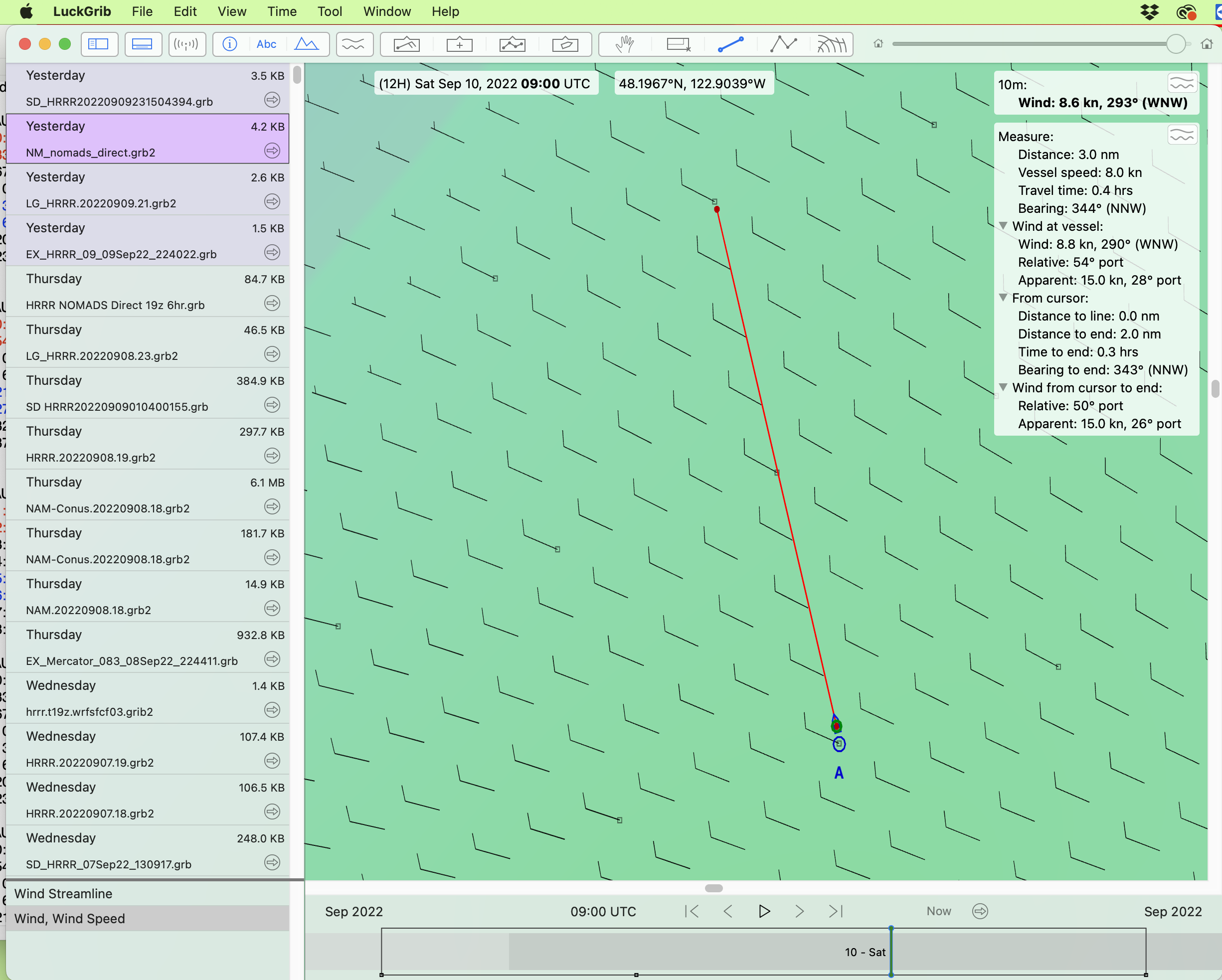
This display in LuckGrib puts a dot on the actual grid points. Wind barbs in between are interpolated. Most grib viewers let users show such a display or show just wind on the actual grid points, which is an important option to prevent us from over estimating the resolution of the actual data.

By drawing a line (or leg of a route) between grid points you can read the orientation of the grid at your location, in this case it is 344T, which is 16º to the left of north.

Below we look at wind directions relative to the grid and to the N/S line.       


Since we do see app interactions with the grib files, I double-checked the actual content of the grib files using another function of wgrib2. This one lets us ask for the specific values it contains for a specific location. Here we ask for the UGRD and VGRD components at the point and time in question.


This is a section of a homemade spreadsheet that computes the magnitude and direction of the wind from U and V.  We see that the data in the files are indeed what we expected them to be based on grid vs N/S reference.

I have checked with the developers of app1 and app2 who both agreed with observations above, and both have made updates that correct this display issue. So with good data, all apps we know of now show the right display. If any questions remain about your data source, look at the coverage maps above to get a rough estimate of the grid angle at your location, which can then be measured as noted, and kept in mind if discrepancies are noted.

A wind direction error of up to 18º or so is, on its own, not that much of an error when we realize that the model forecasts and the buoy and ASCAT reports we use to check them are only ±10º or so. The bigger factor comes into play with optimum routing computations where a consistent shift of 10º can  make a big difference,  and having it off prevents us from getting the best evaluation of a  model forecast. Thus if you have more than one source of HRRR data you might run the route using both of them to see if there is any difference.

Thanks again to Dave Wilkinson for his sharp eye and prudent navigator's practice to not let something slip by that does not make sense.

And thanks to Craig McPheeters, developer of LuckGrib, for ongoing invaluable discussions of grib files and weather models. His overview of models available at luckgrib.com/models and related blog posts on details remain the standards we refer to.
––––––––––––––––

To check these ideas with another model we look at 3-km NAM CONUS model on the East Coast, just off of Cape Cod, where the grid is tilted the other direction, to the right.  We get the model data from LG and from NM. This model is not so readily available as the HRRR—noting we are not using the more popular 12-km NAM. Using the same abbreviations as above, we have the table below summarizing the results.

The apps A1 and A2 are the same as above. We see the actual forecast was for 211, and we see in app A1, which does not correct for the effect, a display of 193. We are on the East Coast with the grid to the right (see coverage maps above), so the grid based wind direction is too low.  The correction must be added on the East Coast and subtracted on the West Coast.  Then app A2 version we have, which does make a correction, sees a grid wind of 193 and corrects in the wrong direction to display 176.

This seems consistent with what we see in HRRR on the West Coast to confirm this research, but  again I stress that both app A1 and app A2 have fixed this display issue in their latest builds.

If you want to test this, here is a link that will get you HRRR model forecast that you can customize as you like, keeping in mind these are hi res files that get big fast.  The date used has to be present day or yesterday, and the latest run will be about 2hr old. Time and date UTC.

https://nomads.ncep.noaa.gov/cgi-bin/filter_hrrr_2d.pl?file=hrrr.t18z.wrfsfcf03.grib2&lev_10_m_above_ground=on&var_UGRD=on&var_VGRD=on&subregion=&leftlon=-70.6&rightlon=-70.0&toplat=42.0&bottomlat=41.7&dir=%2Fhrrr.20220917%2Fconus.   


This is the 3rd  hr forecast computed on 9/17/2022 at 18z  (valid at 21z 9/17) for the lat lon box shown. Change these inputs as needed and paste into a browser to get the grid referenced HRRR forecast. 


Friday, May 27, 2022

Ocean Position Plotting Sheets

First we go over a bit of background and then show how you can create neat plotting sheets using the new NOAA Custom Chart (NCC) app online.

During an ocean passage it is very convenient if not crucial to keep a paper plot of your position as you cross. This is true for a small yacht as well as it is for a large commercial ship or navy ship. The traditional solution for yachts have been to use Universal Plotting Sheets. They are about 13" x 13", spanning 4º of latitude. The user then sets up the meridians to match the latitude selected using a nomogram printed on the sheets. They were originally a DMA product No. VPOSX001, now long discontinued, although still available from third party sources.  There are also numerous free PDF versions online.

These sheets have been and continue to  be used to plot celestial navigation sights to find a position, and then the DR track of the vessel can be made right on these same sheets. In modern times, they are still valuable for plotting GPS positions and planning routes based on forecasted winds, even when cel nav is not in use.


Figure 1. Instructions for setting up a Universal Plotting Sheet from our text Celestial Navigation. The meridians and parallels are not labeled, but the user sets them up this way for any location.  The book explains how these charts can  be scaled up to 30' per 3 inches or even 6' for more accurate cel nav plotting.  Scaling down to cover larger areas, you might double it just fine, (3" = 2º), but much more will begin to introduce distortion into the plotting.

There are other options for yachts to keep track of ocean position when cel nav plotting is not needed.  See optional downloads in Item (30) at starpath.com/getcharts.  We also have there high-res great circle maps of the world we made for mariners at Item (31) on that page.  If you want to print any of these on larger paper, see our note on Printing NCC, which reviews costs and paper sizes.

The key issue with ocean plotting sheets is: do you need to analyze cel nav sights, or not. If you need cel nav plotting then we need sheets that can be expanded to a large scale, just a a couple hundred miles across. This can be done on any size vessel using the Universal Plotting Sheets shown above, but for ships with large chart tables and large budgets there are other options... and with that, we tiptoe into the topic at hand.

You can buy blank charts of the ocean on real chart paper at real chart sizes. There are two NGA series of Position Plotting Sheets that cover these; they are available, purchased individually, at official print on demand (POD) printers such as Maryland Nautical, Paradise Cay, or EastView Geospatial.  

The first style (part number WOBZP9xx) are just blank charts. You choose the Lat range and the charts are labeled with those values, which sets the miles scale, and then you fill in the Lon lines you want. The sheets are 36" x 48". This series has 16 charts, numbers  920 to 936.

A sample is shown below.

Figure 2. An NGA WOBZ Position Plotting Sheet WOBZP926.  Recall you can zoom for details, by clicking the pic, then right click, open in new tab, the zoom.


An index of WOBZ options is shown below:

No. ( Latitude) Mid Lat Scale = 1:x,xxx,xxx

920 (4ºS to 4ºN) 0º 1,095,679

921 (3º to 11º) 7º 1,087,566

922 (10º to 18º) 14º 1,063,344

923 (17º to 24º) 20º30' 1,026,715

924 (23º to 30º) 26º30' 981,220

925 (29º to 36º) 32º30' 924,1984

926 (35º to 41º) 38º 864,517

927 (40º to 46º) 43º 802,596

928 (45º to 50º) 47º30' 741,597

929 (49º to 54º) 51º30' 683,493

930 (53º to 57º) 55º 629,889

931 (56º to 60º) 58º 582,040

932 (59º to 63º) 61º 532,576

933 (62º to 65º) 63º30' 490,222

934 (64º to 71º) 67º30' 841,029

935 (70º to 75º) 72º30 660,992

936 (74º to 78º) 76º 531,840


Recall that a chart scale of say 1:80,000 means that 1 inch on the chart corresponds to 80,000 inches on the land it covers.  In a standard universal plotting sheet we have 3" on the sheet  = 1º of Lat, and 1º of Lat = 60 nmi x 1852 (m/nmi) x 100 (cm/m) x (1/2.54) (inches/cm) = 4,374,803 inches.

So 3" on the sheet =  4,374,803 inches, so the UPS scale = 1:1,458,267. We see that these WOBZP9xx plotting sheets have a larger scale by about a factor of 2 to 3, which makes sense since they both cover 4º and one is about 3 times larger.

The other series of NGA Position Plotting Sheets (Series  (WOXZP9xx) are a bit like an oversized compromise between the NGA plotting sheets shown above and the Universal Plotting Sheets.  A sample is shown below.


Figure 3. An NGA WOXZ plotting sheet WOXZP972.

Below is an index of sheets available  in this series (also 16 options, numbered 960 to 975). Except for the first one, each is set up for N or S latitudes. These charts are printed on 20" x 36" paper but active part of the chart is about 20x20. We are told the the US Power Squadrons use these sheets in their cel nav courses.

960  LATITUDE    2N  to  2S

961  LATITUDE    0 to 4 

962  LATITUDE   4 to 8

963  LATITUDE   8 to 12

964  LATITUDE  12 to 15

965  LATITUDE  15 to 18

966  LATITUDE  18 to 21

967  LATITUDE  21 to 24

968  LATITUDE   24 to 27

969  LATITUDE  27 to 30

970  LATITUDE  30 to 33

971  LATITUDE  33 to 37

972  LATITUDE  35 to 38

973  LATITUDE  38 to 41

974  LATITUDE  41 to 45

975  LATITUDE  45 to 49

Again, both of these NGA plotting sheets styles can be ordered from any POD printer. They are purchased individually, on good chart paper, and sell for $12 up to $26 depending on item and  source.

_________

Now we get to the fun part!

When NOAA announced the discontinuation (sunsetting) of traditional paper charts, they also announced an intriguing new way that mariners can make their own paper charts, covering the regions they care about. The program is called NOAA Custom Charts (NCC). It is still under development with a few notable issues to be resolved, but I am confident that by the time these are our only option for any paper chart (December 2024) they will in fact be superior to the traditional paper charts we are accustomed to.

The key point for our present interest is the fact that we can define the scale we want and the location we want to cover, plus we can control what details of the chart are shown. For plotting, we will shut off as much of the chart info as we can, and then choose a scale convenient for either cel nav plotting or ocean tracking.

Below is an example made—at a student's request—for the waters west of Puerto Vallarta.


Figure 4. Plotting sheet made with the NOAA NCC app. The compass rose has been added.

When you make the sheet (chart) it will not have this compass rose on it, but you can add one if you want by downloading this file Compass_Rose_for_plot-sheet.png, which has a transparent background. Pasting images into a PDF is easy with Adobe Acrobat, but takes takes special steps using free apps from Mac or PC. Depending on what plotting tools you use, you might not need a compass rose (ie triangles or Weems plotter do not need one.)

We have a video on How to make the NCC (27:19) and, again, we have an article on How to Print NCC on big paper.

Another way to make a plotting sheet is to print the screen from a favorite nav program viewing base map only set to the region you want as shown below.


Figure 5. Plotting sheet made from exporting the screen of a nav program. This is from the free program qtVlm. You can also do the same from the free program OpenCPN. For this method, you  might want to mock up a lat-lon interpolator scale. Graphic tools for changing colors once the image is captured are helpful. In the above we turned the dark blue ocean to white, and the while lines to gray.


Post comment/questions here as needed. As time or need arises, I can add a video on this process of making plotting sheets with NCC app.