Saturday, February 25, 2023

Rock Symbols in ENC

While working on another project, it seemed that it would be nice to have one more example of how rocks show up on an ENC, which is what we provide here.  We have several earlier notes on rock symbols

Chart Symbols: Rock or Coral on ENC

Rock Talk 1, Is it Awash or Not?

Rock Talk 2, RNC to ENC

and this image from the last one, summarizes the situation.


The project that brought back the rock symbol question is the very subtle way that a properly presented ENC (i.e., according to IHO Standard S-52)  decides when to show the isolated danger symbol to replace a standard  rock symbol. 

So the goal here was to show the above samples in an actual charting program, where we can change our choice of safety contour and decide if we want to see these symbols inside of the safety contour, or just outside of it.  That article is forthcoming.  For now we just look at samples of the rock symbols in play and have this addition resource for a quick reference.


Here we see the pick reports for each of the rocks that shows most, not all, of the information needed to decide when the symbol might be replaced with the danger symbol, example 5 above.

Friday, January 20, 2023

Sail toward the wind shift

The hallmark of all good navigation is looking ahead. Under sail, the main thing we want to anticipate is wind shifts—currents and traffic are other important factors to plan around, but for now we look at the wind. We look at two practical examples of the general guideline when sailing to weather to sail toward the direction the wind is expected to shift toward. If the wind is anticipated to shift left, then we want to be on the left side of the course when that happens. 

We can often anticipate wind shifts based on the terrain, with no weather pattern changes—such as channeled wind bending into an open bay on one side of the channel—but we also get insights from forecasts. An approaching Low generally brings winds backing to the south, which in a narrow channel running N-S will force a southerly wind to a south-southeasterly in the channel. When a front crosses such a narrow channel, the S-SE wind makes a 100% predictable sudden shift to the S-SW because wind always veers at a front.

In the first example we have a south wind across the area during the start and most of the way to the finish, but there is a strong adverse current in the channel, which means we must choose right or left side to stay out of the strong current in the middle—current is always weaker in the shallower water along the edges. But we have a forecast that the wind will be shifting to the SE or S-SE as a low approaches. We do not know when, but definitely before we get to the south end.

S wind changing to SE. Here we show it happening just at the south end, but this is meant to illustrate where the boats are when the wind all along the channel went from S to SE.

We can choose the east or west side and then tack down the beach. But since we know the wind is shifting to the east (S to SE) we want to be sure to take the east side. See what happens when the shift occurs. The boat on the east side then has a fast reach right to the mark, whereas the boat on the west side has to keep on tacking to get there. This is a shift to the left, so we want to be on the left side.

Below we have another realistic scenario. The wind is now from the SE along the water way and it does not take long as you tack down the middle of the Sound to notice with binoculars that boats along the shorelines are not tacking, they are reaching right down the beach. They are taking advantage of the fact that wind on land is notably backed (shifted to the left) relative to wind on the water. This is a friction effect. And the transition does not take place right at the shoreline, but it extends out into the water to some extent and these reaching boats are riding along in that wind.

Thus in this situation, the logical route is along the shore to take advantage of that, and we could go down either shoreline. But in this scenario, we know from the forecasts that a front is going to pass over us before we get all the way down, so we have a logical side to choose. When a front crosses the sound the wind veers (shifts to the right) in a matter of minutes, so this wind going from SE to SW is shifting to the west, so we want to be on the west side—or put another way, shifting right, we want to be on the right.

And you see again what happens when the two boats meet that shift, one on the east side has to start tacking to the mark, and the one on the west side has a fast reach right to it.


SE wind veering to SW. Here we show it happening just at the south end, but this is meant to illustrate where the boats are when the wind all along the channel makes this change from SE to SW.


The summary is: if the wind is shifting to the right, we want to be on the right side; shifting left, we want to be on the left side.  To think through the shift direction, draw the wind arrows point to point as shown below.


Saturday, November 12, 2022

Adding an image to a PDF

The procedures presented here apply to any application of adding an image to a PDF, but we are focused on a specific marine navigation application. 

The NOAA Custom Charts (NCC) app sometimes has difficulty placing compass roses in best locations.  in which case you can just shut off the compass rose option when creating the NCC and then make one with the free app below. That will generate a NOAA-style compass rose as a PNG file with a transparent background that you can then paste onto the PDF NCC where you choose, and resize as desired.  See Instructions on adding an image to a PDF.


Preliminary Notes

The NCC PDF includes the chart itself and several pages of chart notes. You can print all pages of the NCC on a regular printer paper and that gives you a compressed view of the chart, along with the chart notes. At this stage we can then concentrate just on page 1 of the NCC which is the chart itself.


To remove all pages of the NCC except the chart (on page 1):

1) Open the chart in Google Chrome

2) Choose Print, top right icon

3) Under Destination choose Save as PDF 

4) Under which pages choose Custom and enter 1 in the field below it

5) Print, with the option to rename.


Owners of Adobe Acrobat Pro, with Mac or PC. This is the easiest solution.  


1) Open the PDF in Acrobat

2) Choose Tools tab and then Edit PDF

3) Choose Add Image, navigate to the rose PNG saved, press Open.

4) Resize with a corner control; drag to desired location

5) Click Close top right of the display.  Done


Mac computers use Preview App. (Easy… but involves an unusual trick!)


1) Open the PDF in one Preview window and open the rose PNG in another Preview window.Do this by right clicking the files in the Finder and choosing Open with Preview.


2) In the rose window, click the screen to activate it, then do 

cmd+A to select all, then 

cmd+C to copy all, then 

cmd+V to paste what you copied right back on top of the image, 

then click the center of the image to activate it then

cmd+C to copy

3) go to the NCC window and click to activate it, then do cmd+V to paste the image onto the PDF

4) size as desired and more to desired position, then cmd+S to save and you are done.


PC computers install free graphics program called Inkscape and use it.


1) Open Inkscape, then menu File/Open and open the NCC PDF

2) accept all defaults they offer and choose OK

3) Position the window so you can see the full PDF

4) Do ctrl+A to select All

5) Right click image and choose Lock selected objects

6) Menu Layer / Layers to open the layers window on the right. 

7) Lock the top layer shown which is your NCC chart by clicking lock icon

8) Click + to add a layer; call it “compass rose”; Position “above current”, be sure it stays highlighted


9) Menu File/Open and open the rose PNG

10) Click the rose to activate it, do ctrl+A to select all, then ctrl+C to copy all.


11) Right click the screen and paste the rose

12) Position and size it as desired, then menu Save as, choose PDF format with name of choice, and done.


Wednesday, November 2, 2022

Slow Water Rule

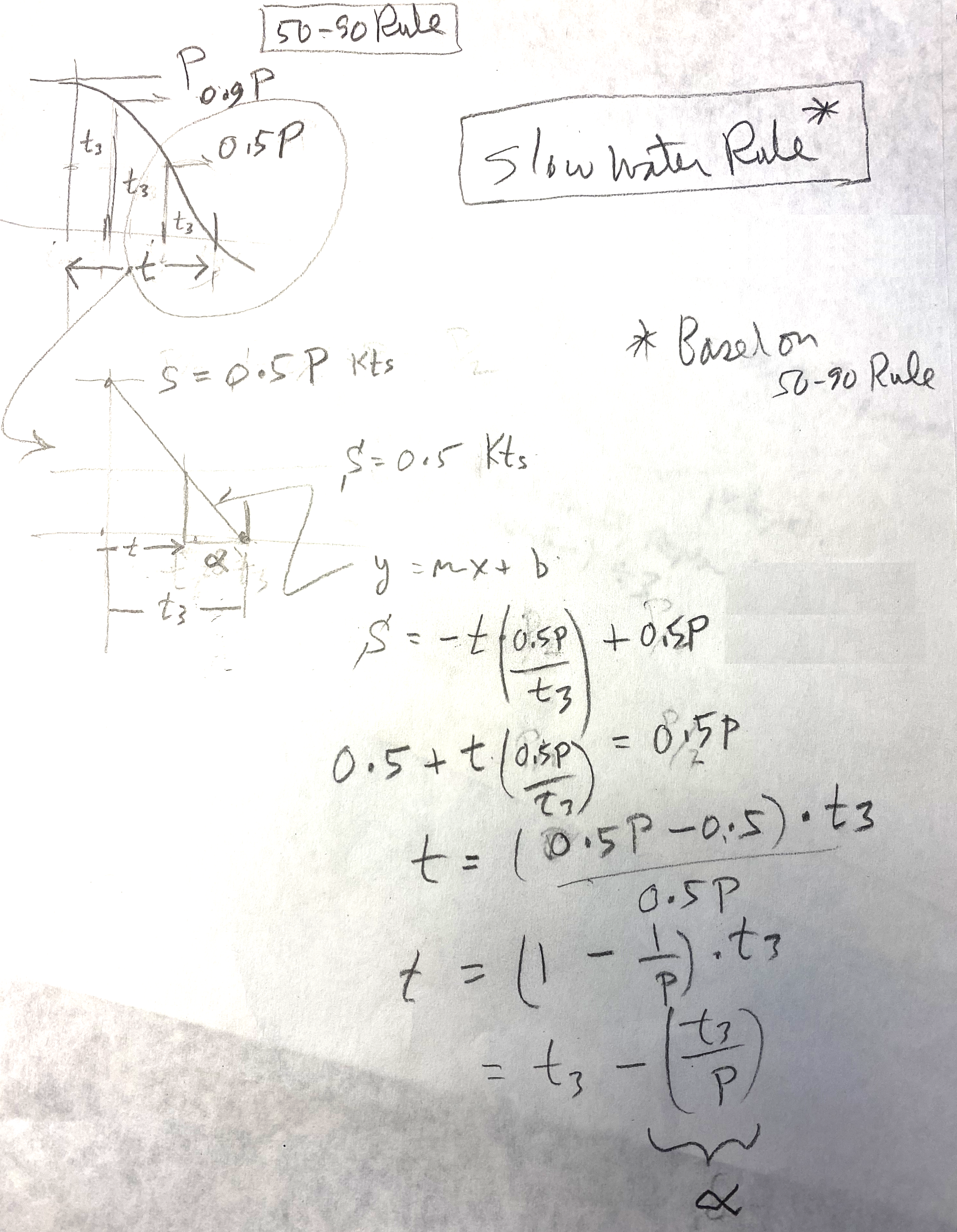
Our 50-90 Rule for estimating tidal current speeds between tabulated peak currents and slacks has been adopted by the US Power Squadrons, who have developed a form for its use. What is less well known is our Slow Water Rule for estimating the time the tidal current will remain below 0.5 kts at each slack time. This rule is actually based on the 50-90 Rule as is shown below.

The Slow Water Rule states that the current stays less than 0.5 kts on either side of slack for a time (in minutes) equal to 60 minutes divided by the peak current speed in knots. This period is usually different on each side of the slack for mixed semidiurnal tides. That very simple form assumes the period from peak to slack is equal to the global semidiurnal average of 3 hr, but there are many cases where this varies from just 2 to over 5. Thus to make the Rule more accurate, replace the 60 min with one third of the actual time interval between peak and slack.


A main purpose of this post is to document how this Slow Water Rule comes from the 50-90 Rule, and that is shown in the hand drawn image below.


In this sketch, t3 is one third of the slack to peak times.  Alpha is the slow water estimate we propose.

Granted, we are looking backwards with these efforts to do navigation in the head, on the wing. Traditional paper charts are being completely replaced with electronic charts (ENC) and with that more and more mariners will be using some form of electronic chart system (ECS) for their navigation...more commonly called just a "navigation app" or "echart app." Popular free ones are OpenCPN and qtVlm, both of which include excellent tide and currents functions that display and plot the tides or currents—which pretty much answer any question we have about this crucial data. Commercial nav programs also, of course, include excellent tide and current presentations that answer tide and current questions with a couple mouse clicks.

In short, traditional methods in all aspects of navigation are likely to be set aside as we move more into more electronic charting. We complained about this when GPS came on the scene, and there will likely be more complaining as the charts get transformed from traditional preprinted fixed editions to the new user-designed and user-printed NOAA Custom Charts (NCC).  It will take a while for the NCC to settle in, but I am confident that in the end they will be in fact superior to the traditional charts they are replacing.